This is a record of my first attempt at AI-assisted coding with Codex CLI—a journey in which I made a catastrophic mess of things, sank into despair, and somehow managed to drag the project across the finish line.
Background
I used to be skeptical of AI-assisted coding. That changed after OpenAI completely dominated some of the world’s best competitive programmers at the AtCoder World Tour Final 2026. I revised my position and concluded that programmers at my level, at least, probably shouldn’t be writing code anymore:
OpenAIのAIがAtCoder世界一決定戦で全問正解、人類王者を「E問題」で封じる – shiritomo | Xで話題のテックカルチャーメディア by HashoutAからEまで5問、持ち時間420分。 7月9日に東京で開かれた競技プログラミング(プログラムを書く速さと正確さを競う競技)の世界一決定戦「AtCoder World Tour Finals 2026 Algorithm」 […]shiritomo
I may be behind the times, but shortly before leaving my previous job, I had a valuable opportunity to experience a small part of AI-assisted development. There was an internal system I had been responsible for operating and maintaining, and for various reasons, I was asked to refactor it before leaving. I argued—quite reasonably, I thought—that it would help my successor understand the system better if they implemented the refactor instead of me, the person who was about to leave. That successor turned out to be practically native to AI-driven development. While moving the project forward as a reviewer, I managed to absorb the general vibe of vibe coding. One of my goals in developing this site was therefore to reproduce the workflow we used at the time, regardless of whether it was actually efficient. In practical terms, I tried the following:
- Use test-driven development
- Create an issue for each change
- Create a feature branch and merge it into
mainthrough a pull request linked to the issue
Workflow
The following three resources were especially helpful:
個人的 Vibe Coding のやりかたZenn Claude Codeで「バイブデザイン」を始めよう — AIとの壁打ちでUIの品質を上げる|坪田 朋こんにちは、坪田です。 今回は、Claude Codeだけで記事詳細ページを1時間でデザインした工程を書いてみました。 前回「デザイナーがFigmaを閉じて、AIエージェントでデザインする日はいつ来るのか」を書いたのですが、「概念はわかった、で、実際どうやるの?」という声を多くもらったので、試行錯誤中だけど実践編として工程を詳しく記載。 環境:なぜClaude Codeなのか 作業環境は Visual Studio Code(VSCode) + Claude Code(CLI版) ClaudeのWebアプリやMacアプリにもアーティファクトやCoWork機能があるが、効率的な坪田 朋
 GitHub - google-labs-code/design.md: A format specification for describing a visual identity to coding agents. DESIGN.md gives agents a persistent, structured understanding of a design system.A format specification for describing a visual identity to coding agents. DESIGN.md gives agents a persistent, structured understanding of a design system. - google-labs-code/design.mdGitHub
Since this was my first attempt at vibe coding, the actual process involved plenty of experimentation, detours, and confusion. Looking back, however, the general workflow I probably should have followed was:
- Have the AI write specification documents that also serve as its external memory, such as
requirements.mdandtech-stack.md - Have the AI write
AGENTS.mdandDESIGN.md - Prepare the development environment, including GitHub and Cloudflare
- Use vibe design to generate wireframes and decide on the layout
- Implement the functionality through vibe coding
- Perform user acceptance testing
You can find the various Markdown files mentioned here in the root and docs directories of the following repository. You are, of course, welcome to read them. One important caveat, however, is that I have barely read any of them apart from AGENTS.md and DESIGN.md. In addition, as instructed in AGENTS.md, these files are continuously updated by the AI. They may also be intended to serve as an interface between humans and AI, but in this project, at least, there was almost no direct intervention from me on the human side.
1. requirements.md and Everything Else
At this point, I was still using the Free plan of ChatGPT. Like the author of the vibe coding article mentioned earlier, I used a lower-tier GPT model. The article separated the requirements-definition phase from the technology-selection phase. When I tried that approach, however, the technology stack and implementation policies I selected did not align with the requirements I had decided on immediately beforehand, resulting in rework. In hindsight, I think it would have been better to discuss the functional requirements, deployment environment, and everything else together, and then have the AI output all the Markdown files at the end.
As the article also explains, the AI basically leads the process, while the human merely answers interview questions. This was an area where I already had some knowledge—I could have done it myself if I were willing to spend the time—so the discussion became fairly detailed. That is probably why the amount of functional rework remained minimal. Naturally, though, that level of discussion takes time. My entire first day of vibe coding ended with this phase alone.
2. AGENTS.md and DESIGN.md
This was my first time creating an AGENTS.md, but it came together without any particular difficulty simply through conversation with the AI. You can see the actual file, but it contains little more than concise instructions for controlling the AI’s behavior: use test-driven development, follow the branch rules, and obtain human approval before committing changes. When I asked a lower-tier GPT model to write it, the result was unnecessarily verbose. Gemini Pro tightened it up and removed the fluff, so I used that version as the foundation and had the AI continue revising it throughout development.
DESIGN.md was much more difficult, because I do not possess even the tiniest fragment of design knowledge. A designer would presumably have all kinds of tools at their disposal, such as complementary colors and established anti-patterns. I, meanwhile, am a complete amateur. I created DESIGN.md with Codex. I cloned Google’s design.md repository mentioned earlier, instructed Codex to reference it along with the specifications in docs, and asked it to interview me before producing DESIGN.md. Once again, all I had to do was answer questions. I gave it instructions such as:
- Keep the design simple and quiet, but warm
- Use values provided by Tailwind CSS wherever possible
- Comply with WCAG contrast-ratio requirements
Put another way, because I knew nothing about design, I also had very few strong preferences. My motivation was basically: as long as it follows some sensible standard and avoids obvious anti-patterns, that is good enough.
One thing I did not do—but should have done—was ask the AI to create some disposable HTML and CSS at this stage so that I could verify DESIGN.md. I assumed, “It asked me a ton of questions, so I’m sure it came up with something decent.” The generated UI, however, had such extreme black-and-white contrast that it hurt my eyes. In trying to comply with WCAG, it had produced a contrast ratio that was pointlessly high. I eventually performed this verification during the wireframing phase, but that was clearly rework. That said, situations where something simply has to be revised will inevitably arise as development progresses. I do not think the decisions made here need to be frozen permanently. It is fine to treat DESIGN.md as a mutable document and update it flexibly.
3. Preparing the Development Environment
I set up the GitHub repository myself, along with the GitHub integration required to deploy the site to Cloudflare. I probably could have delegated everything related to GitHub to the AI. Cloudflare, however, does not appear to have especially comprehensive CLI tooling, at least as far as I know, so I clicked my way through the GUI and established the minimum required connections manually. Even in a project centered on vibe coding, this was one area where having knowledge on the human side seemed beneficial. After that, in preparation for implementation, I asked the AI to break the work down into smaller tasks, arrange them in an appropriate order based on their dependencies, and register them as issues.
4. Wireframes
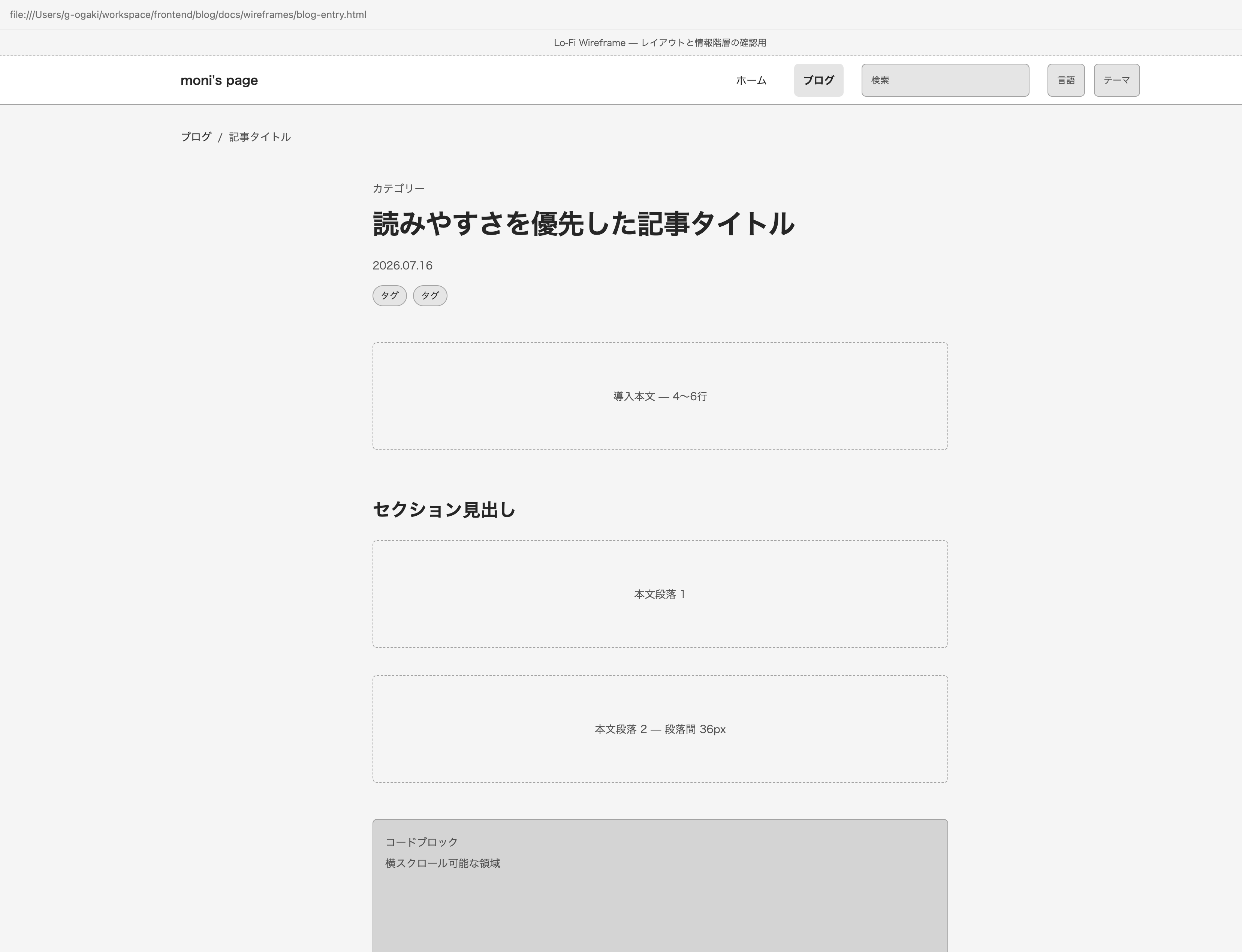
First, I created a lo-fi wireframe for each page. The AI generated HTML files, which I opened in a browser. I then used the developer tools to experiment with margins, font sizes, and other properties, listed the areas that needed adjustment, and asked the AI to revise them. Some basic knowledge of HTML, CSS, and browser developer tools is useful here. I am far from proficient with any of them myself, though, so I imagine you could still manage without that knowledge. Unlike functional implementation, this phase required me to define the correct answer according to my own subjective judgment. Whether you are working with an AI or a human designer, detailed back-and-forth is unavoidable.
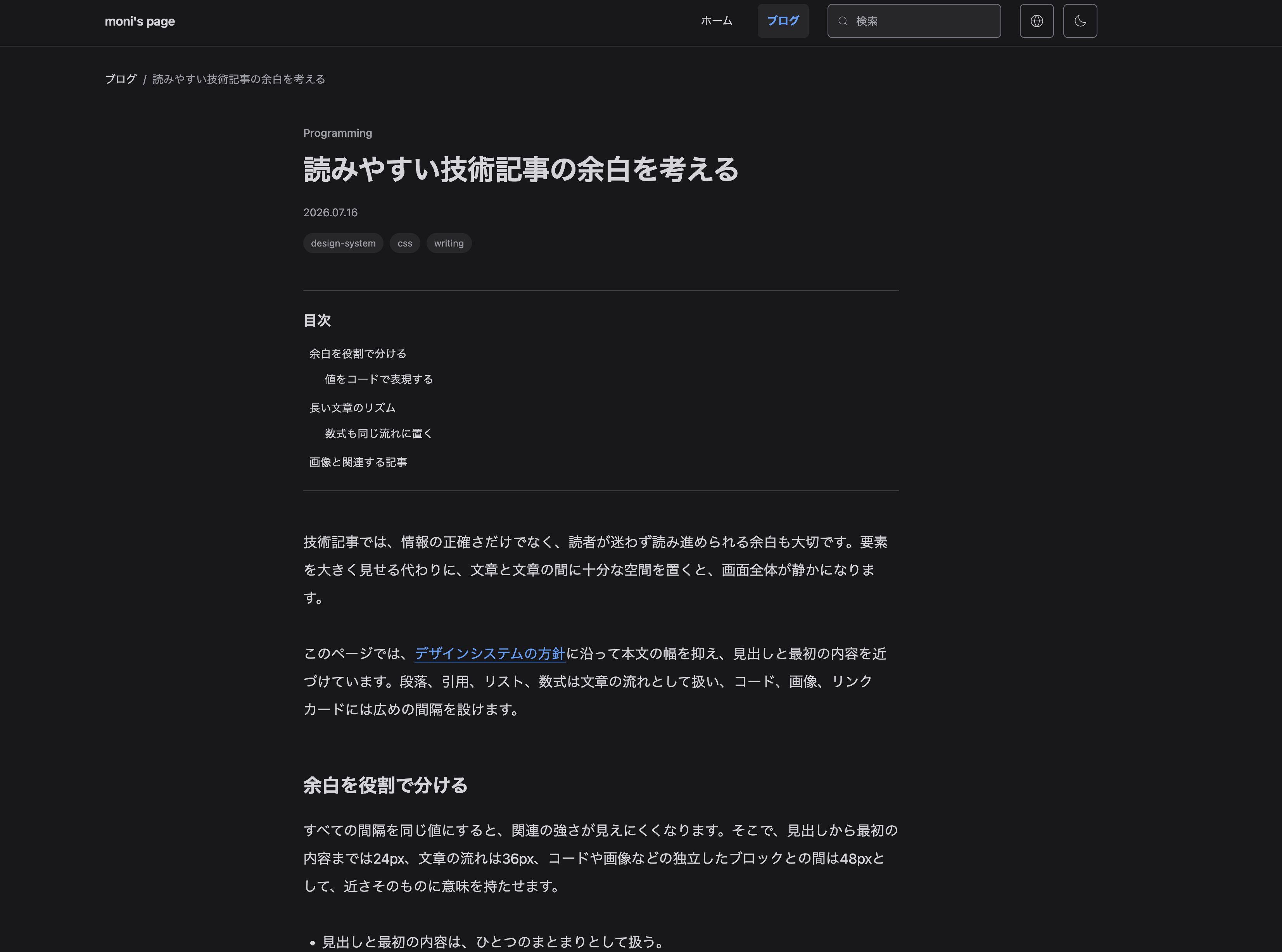
Once the layout had been decided using the lo-fi wireframes, I asked the AI to generate hi-fi versions based on DESIGN.md, with visuals close to the final production design. I then gave it detailed instructions in the same way I had with the lo-fi versions. Lorem Ipsum may be sufficient for some text, but I think it is better to make the content as close to production as possible at this stage. Doing so should reduce unexpected design changes later.
5. Implementation
This is the true essence of vibe coding—and the phase in which the human begins to decay. By this point, the complete set of specifications already exists. All that remains is to leave the work to the AI and kill time watching YouTube. It is a good idea, however, to use plan mode before implementation. Rather than allowing the AI to make assumptions about unclear areas, plan mode encourages it to raise them as questions. Unless I could provide completely exhaustive instructions in the prompt, or the implementation was entirely self-evident, I used plan mode to eliminate as much room for debate as possible.
6. User Acceptance Testing
I checked the homepage and article-listing page in detail for each feature branch. For the article page, however, writing this article itself serves as the user acceptance test. By actually writing an article, I discovered all kinds of things: certain sections did not behave or look the way I had expected, and there were features I had completely forgotten to request. I will have the AI fix them before publishing this article.
Failure Stories
Requirements Definition Without a Single Design Discussion
The initial functional requirements were actually almost complete on the very first day I began using Codex. Then I saw the product the AI had created and collapsed to my knees:
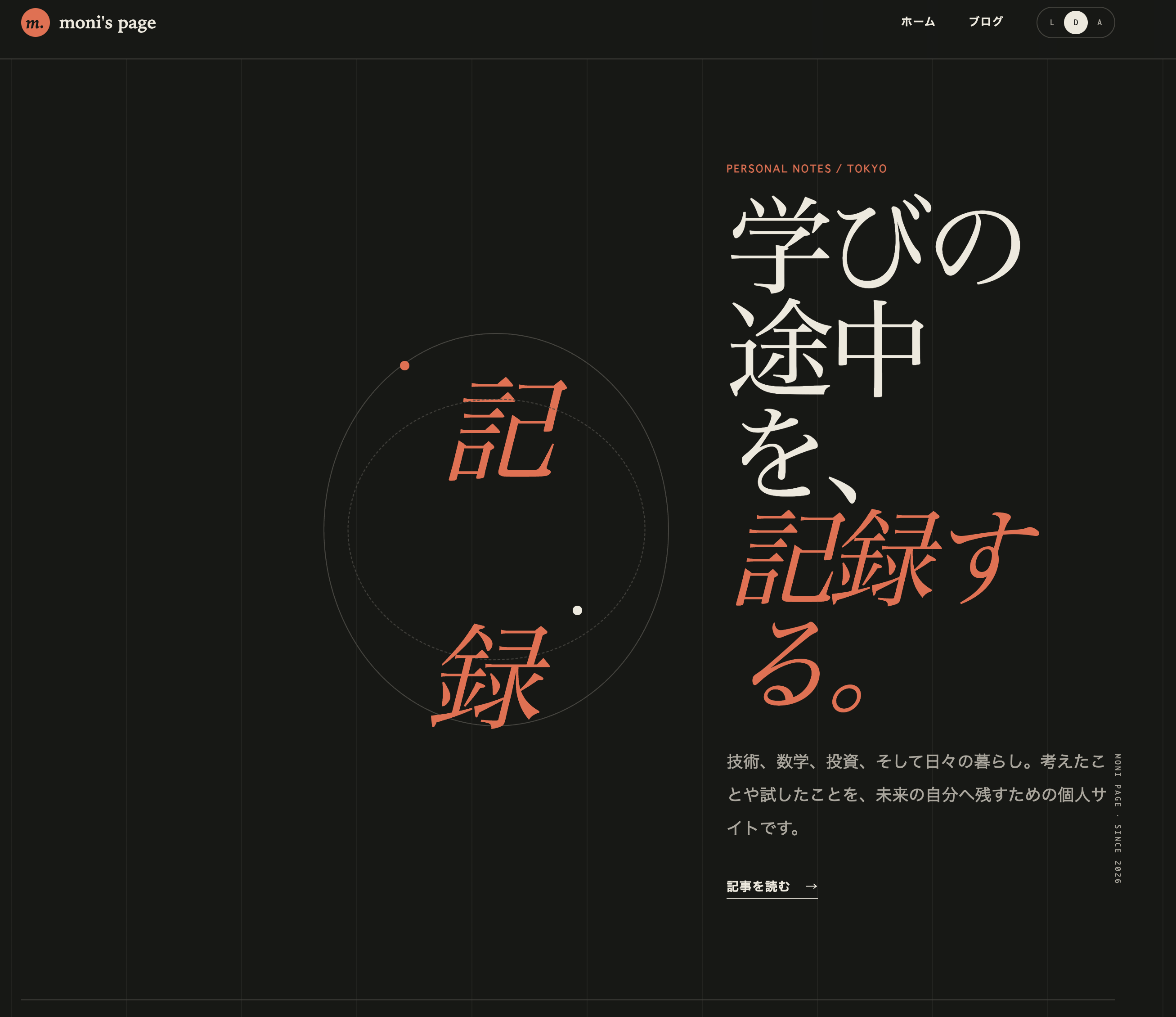
IT’S SO UGLYYYYYYYYYYYYYYYY!!!!!!!!!!! THIS IS WHAT THE LATEST GPT 5.6-SOL CONSIDERS A STYLISH WEBSITE!?!?!?
I thought there was simply no way this could be acceptable, but then I realized something. Isn’t this similar to telling someone, “Anything is fine for dinner,” only to have them disappoint you in exactly the wrong way? When you say “anything is fine,” you already have an unconscious range of acceptable outcomes. That range cannot actually be communicated through the words “anything is fine.”
Even though I had absolutely no ideas about what kind of layout I wanted, I should have found it strange that design never came up during the requirements discussion. In truth, I did find it strange. Design was simply a topic I had avoided at all costs for my entire life, so I escaped into the comforting belief that “the AI isn’t asking about it” meant “the AI will handle it appropriately”—which is practically the opposite of how AI works. Unfortunately, something that does not exist inside my head cannot be brought into reality. I therefore accepted defeat and decided to learn at least a little about design.
The Design System
The layout had turned out like complete garbage, so it needed to be fixed. When I described the ongoing disaster to Gemini, it told me to look at lots of designs, choose websites I wanted to use as references, and list which parts I wanted to adopt and which parts I wanted to avoid. I selected several examples, recorded my observations in a new file under docs, and instructed the AI to revise the layout based on them. Whether my instructions were poor or the task itself was hopeless, almost nothing changed visually. Perhaps once something has already been built, the AI tries to preserve it. Without going through a more fundamental redesign process, it may be difficult to achieve the kind of changes you expect.
I eventually began to think I might have to create the wireframes myself. I even considered abandoning the product, despite its functionality already being nearly perfect. However, I had managed to get through most of the project by blaming everything on the AI, so I started wondering whether I could also delegate most of the design work and minimize the amount I had to learn. While searching online and asking AI for advice, I found the vibe design article mentioned earlier, along with a Qiita article explaining DESIGN.md. The vibe design article presented a stylish design system called Komorebi UI. Since I knew absolutely nothing about design, creating something like that myself seemed difficult. Instead, I decided to place my bet on DESIGN.md, a file format that Google appears to be attempting to standardize for describing design systems.

Layout
My bet on DESIGN.md paid off, and the resulting site no longer looked obviously AI-generated. Even so, as mentioned earlier, a layout that did not exist even inside my head was not going to materialize before my eyes. I reluctantly spent time developing one. That sounds grander than it really was. This site was intended to provide a user experience and functionality similar to major blogging platforms such as note.com, Qiita, and Hatena Blog. The layout could therefore be assembled by borrowing the best parts of each. The homepage required the most thought. Once again, I browsed through the homepages of various personal blogs and collected the elements that looked promising.
Once the layout had been decided, I proceeded to the wireframes, and so on. The actual workflow I followed was therefore: 1 → 2, excluding DESIGN.md → 3 → 5 → 6 → 2, this time including DESIGN.md → 4 → 5 → 6. It was an absurdly wasteful process, packed with rework and consuming tokens as though I were a millionaire.
Postmortem
Broken Layouts
The vibe design article appeared to create both its lo-fi and hi-fi wireframes using vanilla HTML and CSS, so I followed the same approach. Once I was reasonably satisfied with them, I instructed the AI to implement the actual application. The result contained many areas that looked different from the wireframes. In some places, even the displayed text had changed. Admittedly, that was partly my fault for not explicitly saying, “Follow the wireframes precisely.” Differences like those can be fixed simply by issuing that instruction afterward. The more serious problem was layout breakage caused by Tailwind CSS’s reset styles in the application. I ended up verifying the layout once in vanilla CSS and then verifying it all over again in Tailwind CSS.
When I asked Gemini, “Should I have used Tailwind CSS from the wireframing stage?” its answer was: “Definitely yes.” It then added that if I had already decided to develop the site using Next.js and Tailwind CSS, I should have built the wireframes in Next.js as well. Differences between an <img> tag and the <Image> component, among other things, could also cause the layout to break.
There was another reason I should have used Next.js. I created three wireframes one after another. Later, when I requested a change to a shared element such as the header or footer, the AI dutifully applied the same change separately to every wireframe. That would have been avoidable if I had used React and implemented the shared areas as components. Creating the wireframes in Next.js probably would not have consumed significantly more tokens. Separating the environments for no meaningful reason and having to verify everything again was pure waste. This was one of the biggest lessons from the project.
Unnecessary Unit Tests and Vague End-to-End Tests
I followed the example of my former colleague—the native vibe coder—and used test-driven development. For this particular project, however, I think it was a waste of time. There is an important fork in the road: are you going to read the code written by the AI or not? This was a personal project with no stakeholders whatsoever, and I had absolutely no intention of reading the code. Furthermore, when you instruct an AI to follow TDD, it generates a tremendous number of unit tests. As I watched the test suite swell with every new feature, my regret grew stronger: I should never have chosen TDD.
By contrast, I should have defined in advance what needed to be checked during the E2E testing performed after a pull request was created and Cloudflare issued a preview URL. I performed extremely loose checks under the assumption that “this is probably enough,” merged the pull request, and then discovered things such as the mobile layout being completely broken. I ended up fixing those problems through unrelated issues, which was not exactly exemplary development practice.
Initial Development vs. Feature Additions
The approach of creating a separate issue for each feature and developing in small increments was useful during phases such as refactoring, where the initial product already existed and the work mainly involved adjustments. When creating the first rough version from nothing, however, I think it would have been better simply to tell the AI, “Make something decent,” and leave the whole thing to it. The AI even created separate issues and pull requests for placing individual configuration files. I barely read them, approved them, and merged them anyway. The process demanded meaningless human intervention and produced a workflow that benefited neither the human nor the AI.
For Anyone Who Didn’t Understand Any of That
I went to the trouble of implementing a comments feature—which is the sole reason this site is not a completely static SSG, and the sole reason a database exists—so please feel free to ask questions. I have configured it to send notifications to Discord, and I will respond as soon as I notice them.
Loading comments.